



How To Replace Your Hyundai Car Key Battery
Ever pressed your key fob and noticed it takes a few tries before your car unlocks? That small sign means the battery might be running low. Your key fob is more than a remote; it’s your access point to comfort and security every time you start your journey. Understanding how this tiny piece of technology works helps you handle small issues before they become bigger ones. A quick battery change can keep your Hyundai Car Key Battery functioning the way it should.
Knowing When the Battery Is Weak
A fading signal from your key fob is one of the easiest signs to notice. You might have to press the unlock button more than once, or you may need to stand closer to your car for it to respond. In some Hyundai models, a small warning message may even appear on the dashboard. Paying attention to these early hints can save you from the trouble of being locked out or having to rush to replace the battery at the last minute.
When your key fob’s battery starts losing power, it doesn’t stop working immediately. You may still be able to unlock the car manually using the hidden mechanical key inside the fob. However, this should only be a temporary fix. A weak signal means it’s time to get a fresh battery so your key continues to perform without interruption.
What Type of Battery You’ll Need
Most Hyundai key fobs use a small coin-shaped battery called a CR2032. It’s easy to find in local stores and online. Even though this size is common, it’s always a good idea to check your owner’s manual or open the fob carefully to confirm the type before replacing it. Each key fob model may have slight differences, especially across newer and older Hyundai vehicles.
A new battery will help restore the range and reliability of your key fob. Some owners notice that after replacement, the fob responds faster and from farther away. Taking a moment to handle this small piece of maintenance can make daily driving more convenient.
Steps You Can Take
Replacing the battery takes only a few minutes, but it does require gentle care. Start by finding the release button to remove the mechanical key from your fob. Once that is out, you can use a small coin or your fingertip to separate the two halves of the key fob. Inside, you’ll see the small round battery resting in its slot. Gently lift it out, making sure to remember which side faces up. Insert the new one in the same position, close the fob, and you’re done.
After the new battery is in place, test the fob to make sure it locks and unlocks your car as usual. If it doesn’t respond right away, hold the fob near the start button or door handle and try again. Some models may need a moment to reconnect.
When to Visit Our Hyundai Service Department
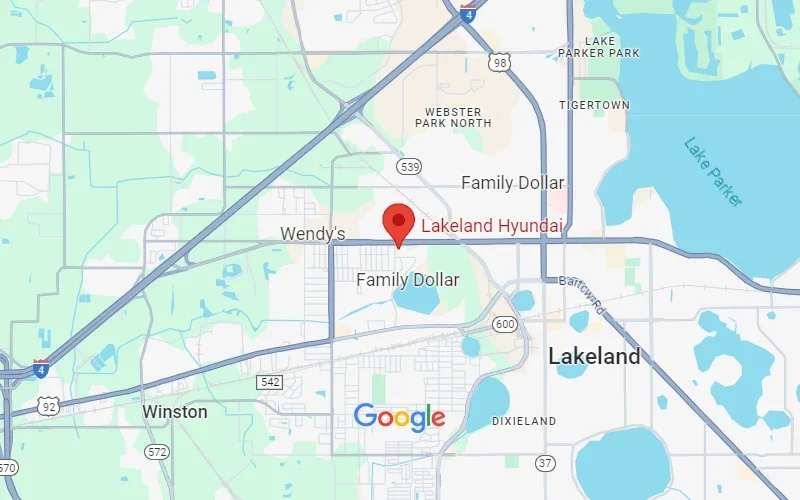
Sometimes, even after replacing the battery, the key fob might still act up. It could be due to wear, moisture, or an internal issue that needs professional attention. That’s where we come in. At our Hyundai service department in Lakeland, FL, we handle everything from key fob reprogramming to complete replacements. You’ll get the right battery type, careful handling, and quick testing to make sure your key fob works like new.
We understand that your time matters. That’s why our trained technicians are ready to help you get back on the road without hassle. If your key fob feels loose, the buttons are sticking, or you’re unsure which battery fits your model, we can take care of it for you.
You can stop by our service department for a quick check or schedule a visit online for convenience. A working key fob means peace of mind every time you approach your vehicle. Visit us today at Lakeland Hyundai to keep your key fob—and your Hyundai—running just the way you like it.
Lakeland Hyundai
Address
1500 West Memorial Blvd
Lakeland, FL 33815
Phone
- Sales 863-583-9200
- Service 863-583-9242
- Parts 863-686-5126
| Monday | 9:00AM - 8:00PM |
| Tuesday | 9:00AM - 8:00PM |
| Wednesday | 9:00AM - 8:00PM |
| Thursday | 9:00AM - 8:00PM |
| Friday | 9:00AM - 8:00PM |
| Saturday | 9:00AM - 8:00PM |
| Sunday | 12:00PM - 6:00PM |
| Monday | 7:30AM - 6:00PM |
| Tuesday | 7:30AM - 6:00PM |
| Wednesday | 7:30AM - 6:00PM |
| Thursday | 7:30AM - 6:00PM |
| Friday | 7:30AM - 6:00PM |
| Saturday | 8:00AM - 4:00PM |
| Sunday | Closed |
| Monday | 7:30AM - 6:00PM |
| Tuesday | 7:30AM - 6:00PM |
| Wednesday | 7:30AM - 6:00PM |
| Thursday | 7:30AM - 6:00PM |
| Friday | 7:30AM - 6:00PM |
| Saturday | 8:00AM - 4:00PM |
| Sunday | Closed |